
This post contains affiliate links. We may earn a small commission when you buy through our links — at no extra cost to you.
A sports timer has one job: count down, sound off, and start again. Do that reliably and your workout runs itself — the sprints, the jump-rope rounds, the rest you actually take instead of the rest you meant to take. Do it badly and you spend every interval fumbling for your phone with sweaty hands, which is the whole reason people buy a dedicated timer in the first place.
Here’s what surprised me: a bigger display isn’t automatically easier to read, and the loudest beep isn’t always the clearest — a screech that cuts through a quiet garage can turn to mush under a gym’s fan and music. I’ve burned plenty of intervals squinting at a screen from across the room, so over the past four months my team and I put 14 timers through the same circuits. The ones that held up were the ones you could read and hear without breaking stride, and program one-handed while holding a jump rope.



Best for Coaching and Drills
ACCUSPLIT Pro Survivor A601X
Key Features
- Digits: Magnum XL
- Battery: 5-year lithium
- Switches: Million-cycle rated
- Screen size: 3 in
- Price: Midrange
A three-inch face with what Accusplit calls Magnum XL digits is why this one lives in our kit bag. Reading a split from across a court, or from a bench with the stopwatch lying on the floor, is the actual job, and the numbers here are the largest and clearest of anything in this group. Direct sun doesn’t wash them out, which is not something every display here manages.
The switches are the second thing we noticed. They’re rated for a million presses, and in the hand that translates to a firm, definite click that fires when you mean it and not when your thumb brushes the case — a real distinction when you’re holding a whistle in the same hand. A five-year lithium cell means you’re not hunting for AAAs the morning of a tournament.
The rest is deliberately plain: a stopwatch, a clock, and an X-shaped case that sits in the palm without much thought. What it doesn’t do is intervals — no repeating chime, no work-rest blocks — so if your sessions are 20 seconds on and 10 off, the Gymboss below is the better tool. For start, stop, and read, this is the one we hand people.
Pros
- Digits readable from across a gym
- Switches resist accidental presses
- Five-year lithium battery
Cons
- No backlight for dim gyms
- Display never fully switches off
For drills, quarters, and splits, we point people here first: the digits read from across a gym and the buttons don’t fire by accident.
Best for Interval Training
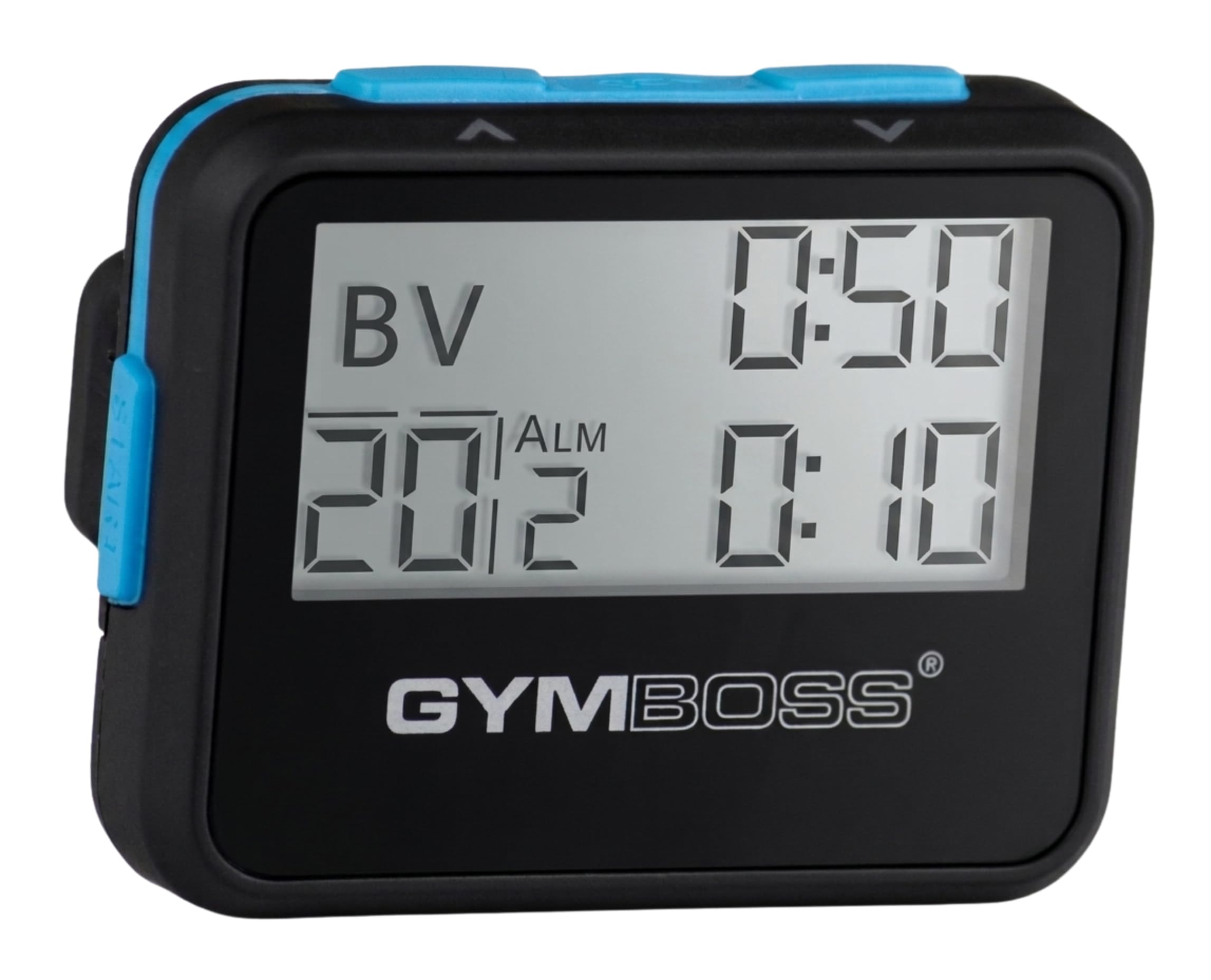
Gymboss Interval Timer
Key Features
- Alerts: Chime and vibration
- Battery: 1 AAA (not included)
- Repeats: Up to 99
- Interval range: 2 sec to 99 min
- Price: Midrange
Two seconds to 99 minutes, one interval or two, up to 99 repeats, and an alert you can set to a chime, a vibration, or both — that’s the whole pitch, and it’s the right one if your training runs on work-rest blocks. The vibration is what sold us: on a busy path or a shared gym floor, you feel the change without announcing it to everyone around you.
Where it beats a plain stopwatch is the programming. You set the work and rest intervals once, choose a repeat count, and the thing counts them out hands-free while you get on with the session — Tabata, circuits, and Galloway-style run-walk all have the same shape. The two-second floor is fine enough for short sprints, and the 99-minute ceiling covers the long end of anything a gym does.
Physically it’s 35 grams of ABS the size of a pager, with a belt clip and enough sweat and impact resistance for a gym bag, and it runs on one AAA that isn’t in the box, so buy a card of them. The plastic case is the part we trust least; nothing about it looks built for a decade of being dropped on rubber flooring.
Pros
- Vibration alerts you without noise
- Repeats up to 99 intervals unattended
- Clip-on size of a small pager
Cons
- Beep is lost under loud music
- Pausing takes three deliberate presses
If your training runs on work-rest blocks, this is the one: set two intervals once and it counts them out by vibration.
Best for Home Gym Wall
LUCORB Gym Timer
Key Features
- Power: USB-C, must stay plugged in
- Control: Remote included
- Display: 2.9 in digits
- Presets: Tabata, HIIT, FGB1/2
- Price: Premium
The LUCORB has to be plugged into a USB-C socket to run; the internal battery only holds the clock settings. So the first question isn’t how well it keeps time but whether there’s an outlet near where you train. In a garage or basement gym that’s an easy yes, and what you get is genuinely good: a 15-inch bar, 2.9-inch digits, and a progress bar that fills as a round runs down.
The rounds counter is the detail we appreciated most — the left number tells you which round you’re in and the bar tells you how much of it is left, so you can look up mid-set and know exactly where you stand without doing arithmetic in your head. The remote does the rest: start, pause, and preset changes from the floor. Tabata, HIIT, and FGB1/2 come preloaded, plus nine custom interval sets.
Volume is where it’s least convincing. In a quiet garage the beep is perfectly clear; with a stereo going it disappears, and that matters if you train to music. Six brightness levels and an auto-dimming sensor also let it work as a wall clock between sessions, which is a nicer thing to look at than a bare stud wall, and the custom sets take more than one attempt before they stick.
Pros
- Digits visible from across a garage
- Remote control from the floor
- Rounds counter and progress bar
- Tabata, HIIT, and custom presets
Cons
- Must stay plugged in to run
- Alarm is quiet under loud music
For a wall in a home gym with an outlet nearby, this is the one: rounds, rest, and a progress bar you can read from the floor.
Best for Rack-Mounted Sessions
Body Sport Digital Timer
Key Features
- Modes: Count up and countdown
- Mount: Magnetic back
- Power: 1 AAA (included)
- Screen size: 1.5 in
- Price: Midrange
Where the Accusplit lives in your hand, this one lives on the rack. There’s a magnet on the back that grabs a squat rack, a treadmill rail, or a fridge door, and it holds — which is the whole reason we keep one stuck to the upright rather than buried in a drawer. The countdown ends up in front of you for the entire set instead of in your pocket.
The screen is 1.5 inches, so don’t expect to read it from across a room; a foot away, the digits are big and clear. Three buttons do everything: count up like a stopwatch, count down for a rest period, hold. There’s nothing to program beyond a time, which is exactly the appeal if you’ve ever stood over a stopwatch trying to remember which button does what.
Power is the catch. There’s no on/off switch and no auto-shutoff, so the display runs until the cell dies; keep a spare AAA in your bag and you’ll never notice, forget it and you’ll find the thing flat when you reach for it. Where it makes sense is a home setup with a rack or machines: set a rest countdown, stick it on the upright, and the number is in front of you for the whole set. As a pocket timer for running, the magnet is wasted.
Pros
- Magnet holds it to racks and machines
- Big digits despite the small screen
- Three buttons, nothing to learn
Cons
- Chirps with every button press
- Buttons get knocked in a bag
For a rack or a machine at home, this is the one: the magnet puts the countdown where your eyes already are, and three buttons cover it.
Best for Spare or Second Timer
PULIVIA Stopwatch

Key Features
- Weight: 1.6 oz
- Lanyard: 47 in
- Accuracy: 1/100 second
- Timing range: 99 h 59 min 59 s
- Price: Budget
Lowest in this group on price, the PULIVIA arrives with a 47-inch lanyard, split and time-out modes with separate start/stop and reset buttons, a calendar and a clock, and a stopwatch that runs to 99 hours, 59 minutes, and 59 seconds at hundredths of a second. On paper that is a lot of stopwatch for the money.
In the hand it feels like what it is: a light nylon-and-plastic case at 1.6 ounces, with an interface that wants to be a wristwatch as well as a stopwatch. The long range is more capacity than a practice needs; the lanyard and the split timing are the parts you’ll actually use. Our judgment is that it belongs in the kit bag as the spare rather than in your hand as the first choice.
Where it gives ground to the Accusplit is the buttons — they trip on the lightest touch, so a thumb brushing the case starts or stops the clock without you meaning it. Read the instructions before your first session; the mode layout isn’t self-evident, and fumbling through it wastes the time you were trying to record. For what it costs, though, a second stopwatch with a neck strap that you won’t mourn is a reasonable thing to own.
Pros
- Lowest-priced timer here
- Times up to 99 hours 59 minutes
- 47-inch lanyard included
Cons
- Buttons trip on the lightest touch
- Menus are fussier than a stopwatch needs
A cheap, capable spare: split timing, a neck strap, and a huge timing range, with buttons that need a light touch.
Best for Team Programs
Pgzsy 6-Pack Stopwatch

Key Features
- Pack: 6 stopwatches
- Battery: 1 LR44 each (included)
- Accuracy: 0.01 second
- Water resistance: Daily splash
- Price: Budget
Six stopwatches in one box is the whole argument, and for a PE department, a coaching staff, or a club running several drills at once, it’s a good one — everyone gets a timer instead of passing a phone around the gym. Each unit does hundredths of a second, splits, a clock, a calendar, and an alarm, on an LR44 that comes in the box.
They’re light and shaped for a one-handed grip, with daily splash and drop resistance, which is about right for a gym floor. What you’re buying is the count rather than the finish: the plastic is plain, the buttons need a firm press, and this is the trade we accept for six of them at once.
Count them and test each one the day the box lands. Pack contents can come up short and a button can feel dead before you’ve worked out whether it is, so run every unit through start, stop, and reset before the first practice. As a personal timer it’s the weakest of this group; as a program’s set it’s the cheapest way to put a timer in six pockets.
Pros
- Six timers for about the price of one
- 0.01-second timing on each unit
- Splash and drop resistant
Cons
- Buttons are stiff and slow to respond
- Plain plastic case feels built to a price
For a program that needs six timers at once, this is the buy: plain units, batteries in the box, and a spare in every bag.
How We Picked and Tested Sports Timers
We started by gathering every interval-capable timer we could find — gym-box clocks, round timers, pocket stopwatches with countdown alarms — then cut the list by programmability, digit size, and price. Anything that couldn’t store a custom work/rest interval was out. That left 14 units, which we lived with for four months across garage circuits, a high school track, a crowded fitness studio, and my driveway during a kids’ conditioning practice.
Readability and volume got the most attention, since they’re the two things you can’t work around. We set each timer, walked back to 10, 20, and 30 feet, and tried to read the digits mid-set without stepping closer — noting digit height, backlighting, and whether the numbers washed out at an angle. For volume, we played a recording of gym noise through a speaker and counted how many beeps out of ten we could hear clearly from across the room, then checked whether the loudest setting could be dialed down or muted for shared spaces.
Ease of use was timed: from a cold start, how long did it take to program a 20-round, 20-seconds-on, 10-off circuit one-handed? We ran that same workout twice a session and watched whether the beeps landed on schedule beside a reference stopwatch, and whether the timer held count-up and clock modes without a re-read of the manual. Then we got careless — waist-height drops onto concrete, a week rattling around a gym bag with keys and a water bottle, batteries swapped in a dim car. Value came down to what was in the box: mounting hardware, battery type, and instructions that actually explained the interval menu.
How to Choose a Sports Timer
The first decision isn’t brand or budget — it’s whether you need to hear an interval or read a clock, and those two jobs lead to different devices.
Match the device to the job
The simplest split in this category is between a stopwatch and an interval timer. A stopwatch counts up, takes splits, and stops when you press it — the right tool for timing drills, quarters, rest between sets, or a lap. An interval timer counts down a work block, then a rest block, then repeats on its own, which is what Tabata, circuits, and run-walk training actually need. A wall unit like the LUCORB is the third case: the same interval logic, sized for a room instead of a hand. Buy the one that matches how you time, not the one with the longest feature list.
Alerts you can actually perceive
Chime, vibration, or both matters more than any volume figure on a box. A beep that carries in a quiet garage can vanish under a stereo or a gym full of bouncing basketballs, and no listing tells you how it fares against your noise. Vibration is the safer bet for outdoor and shared-space training, because you feel it against your body; sound works better when the unit sits across the room on a rack. Check the alarm length too — a one-second blip mid-set is easy to miss.
Look at digit size, not screen size
A 2.4-inch screen can carry smaller digits than a 1.5-inch one, so compare the numbers rather than the diagonal. Contrast matters just as much: a high-contrast LCD is readable in direct sun and hopeless in a dim corner, while a backlight fixes the second case and does nothing for the first. If the timer is going on a wall, judge it from where you’ll actually stand between sets, not from arm’s length.
Power, and the switch that isn’t there
Most timers here run on a AAA, one uses a button cell per unit, and the Accusplit carries a lithium cell rated at five years. The detail that catches people is the missing off switch: several of these have no power button and no auto-shutoff, so the display keeps running between sessions and the battery is flat the morning you need it. Keep a spare cell in your kit, or pick one that plugs into the wall or runs on a long-life lithium.
Carrying, mounting, and surviving the bag
Where the timer lives decides the mount: a belt clip or lanyard for someone moving around a court, a magnet for a rack or a machine, a wall bracket and remote for a room. Check the surface first — a magnet needs steel, and a wooden rack won’t hold one. On durability, treat these as sweat- and splash-resistant rather than waterproof; wipe one down after a session and it will outlast the ones left damp in a bag.
Frequently Asked Questions
Can I just use my phone’s timer instead?
For a single countdown, yes — the phone is already in your pocket and it does the job. The case for a dedicated timer starts at repeats: you can’t reliably hear a phone under a gym stereo, and unlocking it mid-set costs you the seconds you were counting. If a session has more than a couple of timed blocks, a clipped timer earns its place.
What settings do I need for a Tabata session?
Tabata is 20 seconds of work and 10 seconds of rest, repeated eight times for four minutes. On a two-interval timer, set the first interval to 20 seconds, the second to 10, and the repeat count to 8. On a wall unit with presets, choose the Tabata mode and press start. Run one easy round first so your shoulders are warm before the clock matters.
What does a timer cost to keep running?
Most here take one AAA, the six-pack uses an LR44 per unit, and the Accusplit’s lithium cell is rated for five years. The recurring cost is small but real when a timer has no off switch and drains in a bag between sessions. Buy AAA cells in a pack and keep one taped inside your kit.
Final Verdict
If you want one timer to cover drills, quarters, and splits, buy the Accusplit. The digits are the biggest here, the switches don’t fire when you brush them, and a five-year lithium cell means it’s ready when you pull it out of the bag.
Change that only for a specific reason. The Gymboss if your sessions are work-rest blocks you want to feel rather than watch, or the LUCORB if the timer is going on a wall and staying there — which needs an outlet within reach of the mount, not just a spare hook.